
Your website is already a product video
The headline, the product and the proof are already on your homepage. Most product videos start from a blank page anyway. Why that’s backwards.
Sep 26, 2026
A screen recording shows how your product works. A product video shows why it matters, in seconds. When to use each, and how to tell which you have.

Ask a software company for its product video and there’s a good chance you’ll get a screen recording. Someone opened the app, pressed record, clicked through the main workflow and talked over it. It took an afternoon. It’s on the homepage.
There’s nothing wrong with a screen recording. It’s the right tool for a job. It just isn’t the job the video at the top of your homepage has to do, and the difference explains a lot about why so many homepage videos get watched for a few seconds and abandoned.
A screen recording is made for someone who has already decided to care. They’ve booked a demo, or signed up for a trial, or they’re a customer trying to learn a feature. They’ve chosen to spend five minutes on your product, and what they want is to see how it works. They’ll wait while a page loads. They’ll follow the cursor.
The video at the top of your homepage is for someone who hasn’t decided anything yet. They arrived from a search result, a link or an ad, and they’re trying to work out whether you’re worth their time. Nielsen Norman Group’s research on page visits found that people often leave within 10 to 20 seconds, and that pages holding attention longer do it by communicating a clear value proposition fast. [1] That’s the whole budget. Nobody in that position will watch a cursor travel across a screen.
So the two formats answer different questions. A screen recording answers “how does it work?” A product video answers “why should I care?” Put the first where people are asking the second and it fails, however well it was made.
The clearest difference between the two is what fills the time.
In a screen recording, most seconds are spent on things nobody needs to see: the cursor moving to the next button, a menu opening, a field being typed into, a spinner. That’s what using software looks like. It’s honest, and for a learner it’s useful.
In a product video, every second has to carry part of the argument. If a shot doesn’t show the product doing something the viewer cares about, or say something they need to know, it comes out. A thirty-second film might contain six claims. A thirty-second screen recording usually contains one, plus waiting.
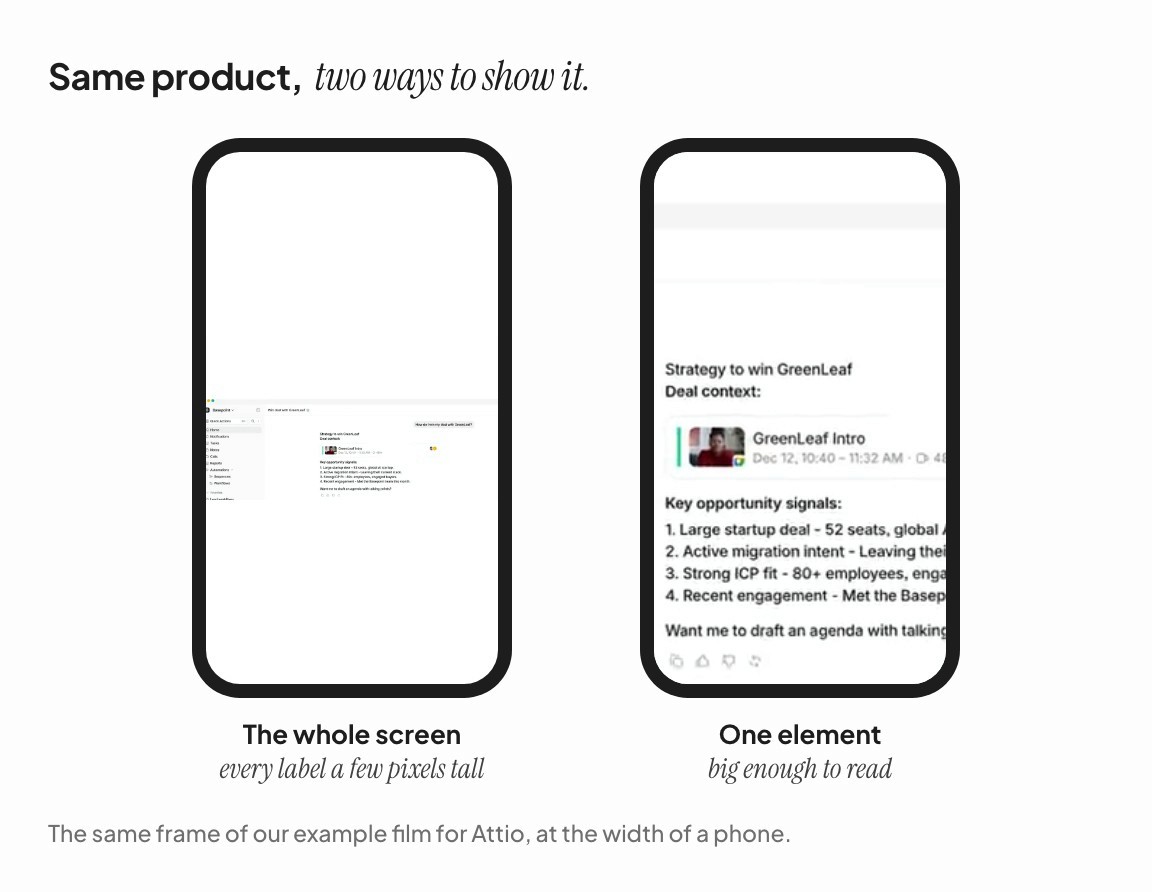
Screen recordings show the whole screen at the size it was captured. That works when the viewer watches full screen on a laptop. At the top of a homepage, the video might be 600 pixels wide. On a phone it might be 350. At that size, the interface text in a full-screen recording shrinks to a few pixels high, and the viewer is looking at an unreadable grey rectangle with a cursor on it.
A product video frames the one element that matters, at a size someone can read. The card, the chart, the row, the button. The rest of the screen is context the viewer doesn’t need yet.
Most screen recordings depend on a voice. The narration explains what’s happening, and without it the viewer sees clicks with no meaning attached.
But the first time someone sees the video on your homepage, it plays on mute, because browsers won’t autoplay sound. [2] A screen recording with the narration muted is a silent film of someone else using software. A product video is built to work on mute from the start: the words are on screen, and the timing comes from a beat rather than a voice. (Design your product video for sound off covers how.)
A recording follows the workflow, because that’s the order you click things in: log in, create a project, add a teammate, set up the integration. A product video follows the argument: here’s the promise, here’s the product keeping it, here’s proof, here’s what to do next. The best moment in your product is often buried at step nine of a workflow. In a film it can come first.
Watch your homepage video on your phone, on mute, and ask four questions.
Within the first few seconds, do I know what this product does?
Can I read every word on screen at this size?
Is anything on screen just waiting, like a cursor moving or a page loading?
If I stopped watching halfway, would I have learned the main thing?
If the answers are no, no, yes and no, you have a screen recording doing a product video’s job.
This isn’t an argument against screen recordings. People who are deciding whether to buy often want to see the real workflow, and a demo recording answers that better than anything else. It belongs on a features page, in a sales follow-up, in your help centre, and after the click on “See how it works”.
The mistake is putting it first. The top of the homepage is where a stranger decides whether to find out more. Give that moment a product video. Link the recording from it for the people who say yes.
Jakob Nielsen, “How Long Do Users Stay on Web Pages?” (Nielsen Norman Group, 2011), analysing Microsoft Research data on page dwell times.
Chrome for Developers, “Autoplay policy in Chrome”; MDN, “Autoplay guide for media and Web Audio APIs”.

