
Your website is already a product video
The headline, the product and the proof are already on your homepage. Most product videos start from a blank page anyway. Why that’s backwards.
Sep 26, 2026
Subtitle standards put the 30-second reading ceiling near 80 to 100 words. A product video should use about 40. The math, and data from six real films.

The short answer: about 40 words, if the viewer also needs to watch your product. The absolute ceiling, for a viewer who does nothing but read, is roughly 80 to 100.
Here’s where both numbers come from, and why the smaller one is the one to plan around.
The people who have thought hardest about how fast viewers can read text on a screen are the people who write subtitles. They have to put a whole film’s dialogue on screen, at the speed it’s spoken, without losing the audience. Their limits are a good ceiling for any video.
The BBC’s subtitle guidelines recommend a rate of 160 to 180 words per minute, which works out to about a third of a second per word. [1] Netflix sets its limit in characters instead: up to 20 characters per second for adult programmes, 17 for children’s. [2]
Run those numbers for 30 seconds:
Standard | Rate | In 30 seconds |
|---|---|---|
BBC | 160 to 180 words a minute | 80 to 90 words |
Netflix, adult | 20 characters a second | about 95 words |
(For the Netflix row we used the average length of words in the on-screen lines of our own films, about six characters including the space after each word.)
So a viewer who spent all thirty seconds reading could take in somewhere around 80 to 100 words.
You may have seen much higher reading speeds. A 2019 review of 190 studies found that adults silently read English non-fiction at about 238 words per minute. [3] At that rate, 30 seconds holds almost 120 words.
That number is for reading a page, where the reader sets the pace, can glance back, and can reread a sentence they missed. On-screen text is paced by you, not the reader, and when a line leaves the screen it’s gone. That’s why subtitle standards sit well below reading research, and why they’re the right ceiling for video.
A product video isn’t a subtitle track. The words aren’t describing something the viewer is listening to. They’re sitting over a product the viewer also needs to look at. Every second spent reading is a second not spent watching the interface do its thing.
So split the time. If the viewer spends about half of it reading and half watching, a 30-second video has room for about 40 words, and a 60-second video for about 80. Treat that as the most you should plan for. In practice you’ll often use fewer.
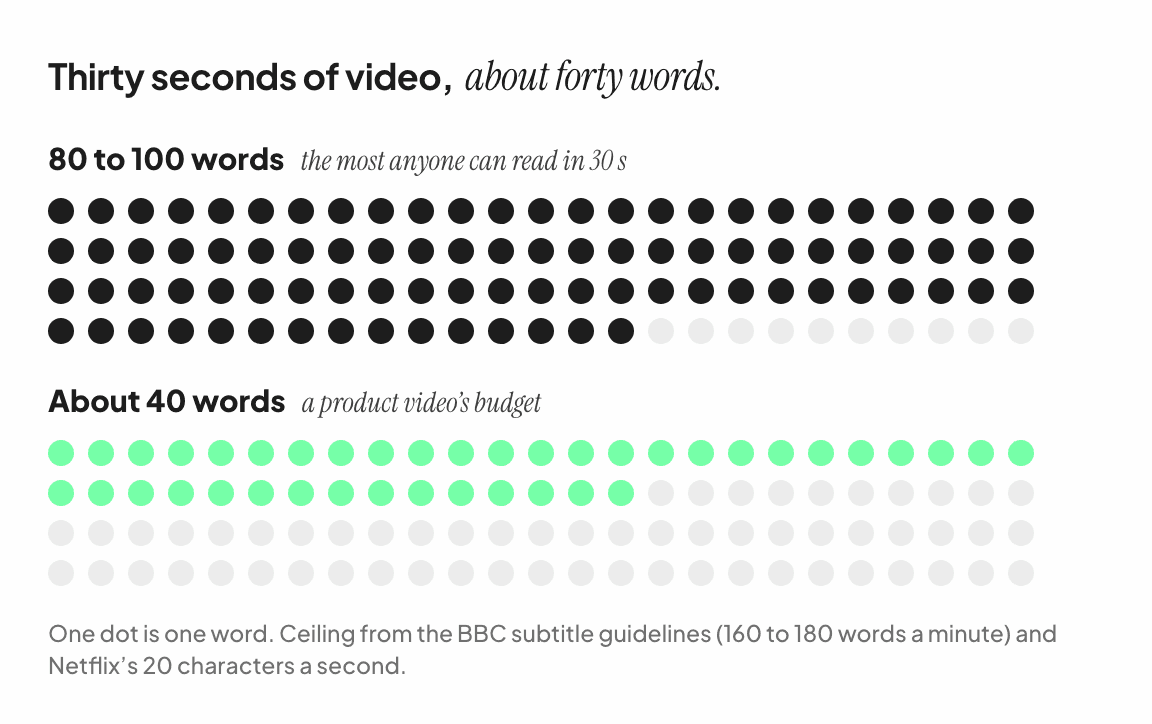
Here’s what that looks like in practice. These are the six example films we made from public homepages, none of them commissioned. Each carries six lines of text. The last column is the share of each film a viewer needs just to read every word, at the BBC’s pace.
Example film | Length | Words | Reading |
|---|---|---|---|
Checkout tool | 35 s | 28 | 28% |
Payments platform | 37 s | 30 | 28% |
Docs and wiki tool | 35.5 s | 33 | 33% |
No-code app builder | 36 s | 28 | 27% |
Product analytics | 34.5 s | 36 | 37% |
Website builder | 32 s | 36 | 39% |
Every one of them spends between a quarter and two fifths of its running time on reading, and the rest on the product. That’s about the balance you want: enough words to make the argument, and enough time for the viewer to see it being true.
The line limit comes from subtitles too. Netflix caps a subtitle line at 42 characters. [2] At about six characters per word, that’s roughly seven words.
Seven words is also close to what fits across a vertical 9:16 frame at a size you can read on a phone, which matters because the same lines have to work in every shape the video comes in. (Why you can’t just crop a 16:9 video to 9:16 covers the layout side.)
Thirty of the thirty-six lines in the films above are six words or fewer. Five run to seven or eight, and one to eleven.
At the BBC’s rate, a six-word line needs about two seconds on screen, and a seven-word line about two and a half. The BBC also suggests a floor of roughly 0.3 seconds per word for short subtitles. [1]
Round up, not down. A line that leaves the screen before the viewer finishes it is worse than a line that stays a beat too long, because the viewer notices the first and doesn’t notice the second. If your video cuts on a musical grid, hold each line for a whole number of beats. (Design your product video for sound off explains the grid.)
Forty words is not a lot. That’s the useful part.
It means you can’t list six features, so you pick the one or two that matter and show them. It means adjectives go first, because “powerful”, “seamless” and “modern” cost words and prove nothing. It means numbers earn their place, because “30,000+ customers” does in three words what a sentence of praise can’t. And it means you’ll probably end up with a sharper argument than the one you started with, because a constraint this tight doesn’t leave room for hedging.
If you’re not sure where the forty words should come from, start with your own homepage. (How to write a product video script from your own website walks through it.)
Budget up to about 40 words per 30 seconds of video. Treat 80 as a hard ceiling.
Keep lines to about seven words.
Hold each line for at least a third of a second per word, and round up.
Spend between a third and a half of the running time on reading, and the rest on the product.
Cut adjectives before you cut numbers.
BBC Subtitle Guidelines, section 4, “Timing” (version 1.2.5, March 2026).
Netflix, English (USA) Timed Text Style Guide, on character limits per line and reading speed limits.
Marc Brysbaert, “How many words do we read per minute? A review and meta-analysis of reading rate”, Journal of Memory and Language 109 (2019).

