
How to make a SaaS product video, step by step
A step-by-step guide to making a 30-to-60-second product video for a software company: the words, the shots, the timing, the shapes and the embed.
Sep 26, 2026
Six product films made from six SaaS websites: every line, the page it came from, and what’s on screen under it. What the six share, and why.

Most lists of product video examples are a column of embeds, each with a line of praise under it. You can’t learn much from that, because you can’t see the decisions. Where did the words come from? Why that screen and not another one? Why does the film end where it does?
We can answer those questions for six films, because we made them. Each is an example film we built from one company’s public website: Stripe, Checkout Page, Notion, Bubble, PostHog and Framer. None of them was commissioned. [1] That makes them fair examples. We had nothing to work from except what each company had already published, which is exactly the position you’re in with your own site.
For each film you get the line sheet (every word on screen and the page it came from), what the picture does under those words, and the one decision worth stealing.
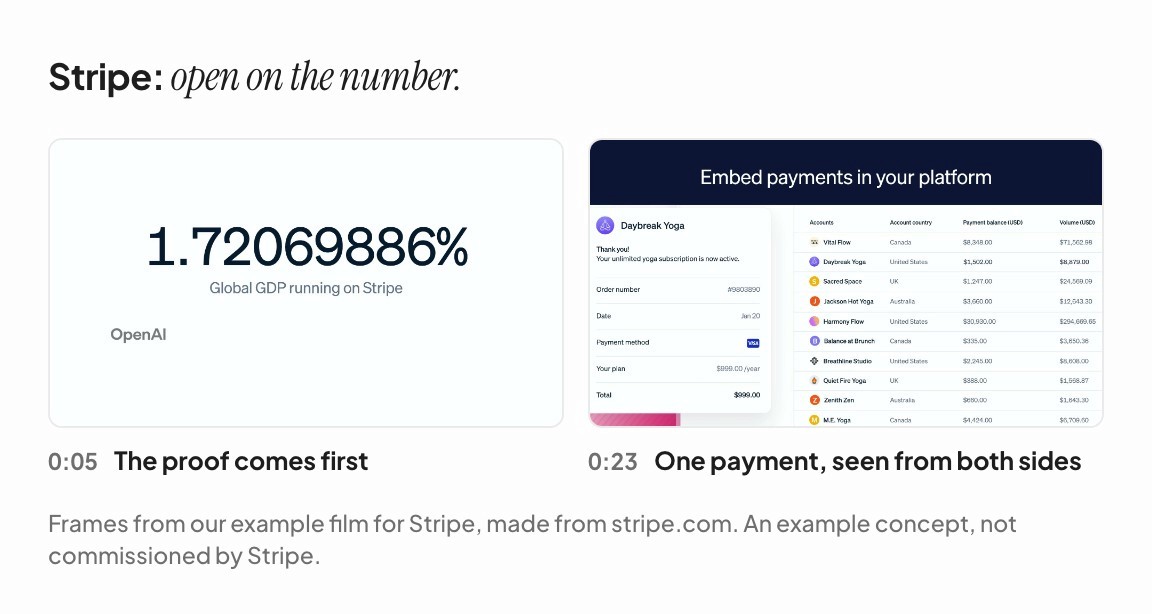
Most films save their proof for the end. Stripe’s homepage makes the opposite bet. The first thing on stripe.com is a live counter above the headline, “Global GDP running on Stripe”, ticking away to eight decimal places. So the film opens there too. Right after the wordmark, the counter runs between two values the page itself printed, with five customer logos under it.
The product moment comes at “Embed payments in your platform”. A cursor presses Pay $999.00 on a yoga studio’s checkout, the receipt appears, and in the platform’s ledger next to it the studio’s volume counts up from $7,880.00 to $8,879.00. One payment, seen from both sides, using the page’s own numbers.
Line on screen | Where it came from |
|---|---|
1.72069886% Global GDP running on Stripe | stripe.com, the live counter above the headline |
Financial infrastructure to grow your revenue | stripe.com, the headline |
Flexible solutions for every business model | stripe.com, a section heading |
Embed payments in your platform | stripe.com, a product card |
Accept and optimize payments globally | stripe.com, a product card (trimmed before “online and in person”) |
Get started | stripe.com, the main button |
Steal this: if your homepage opens with a number, your film can too. Proof doesn’t have to wait until the end. Watch the Stripe example.
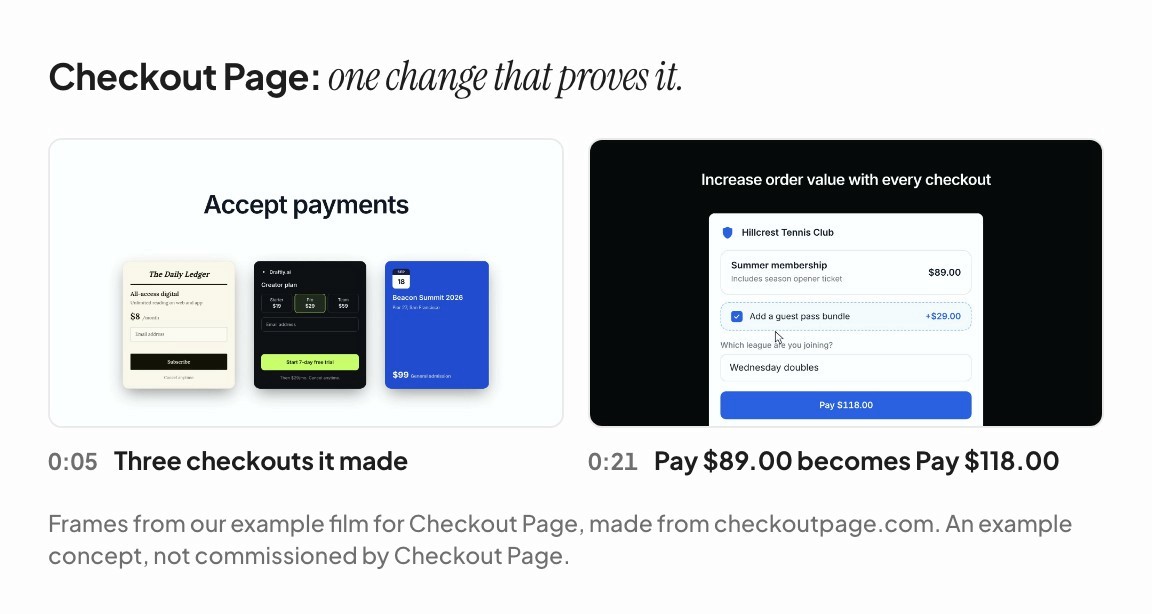
Checkout Page makes checkout pages, so the film is built from checkouts, and its key shot turns on one thing changing. The line is “Increase order value with every checkout”, over a tennis club’s membership checkout. A box is ticked, “Add a guest pass bundle” (+$29.00), and the button changes from Pay $89.00 to Pay $118.00. That’s the whole argument for order bumps, made in about a second, without a word of narration.
Line on screen | Where it came from |
|---|---|
Accept payments | checkoutpage.com, the headline (trimmed from “Accept payments on your website”) |
Your checkout, on your page | checkoutpage.com/embedded-checkout, a section heading |
One platform for everything you sell | checkoutpage.com, a section heading |
Increase order value with every checkout | checkoutpage.com, a section heading |
Trusted by 16,000+ businesses worldwide | checkoutpage.com, a section heading |
Start selling for free | checkoutpage.com, the main button |
Steal this: for each line, find the one state change in your product that proves it. A number goes up, a button changes, a row appears. A screen that changes is evidence. A screen that sits still is a screenshot. Watch the Checkout Page example.
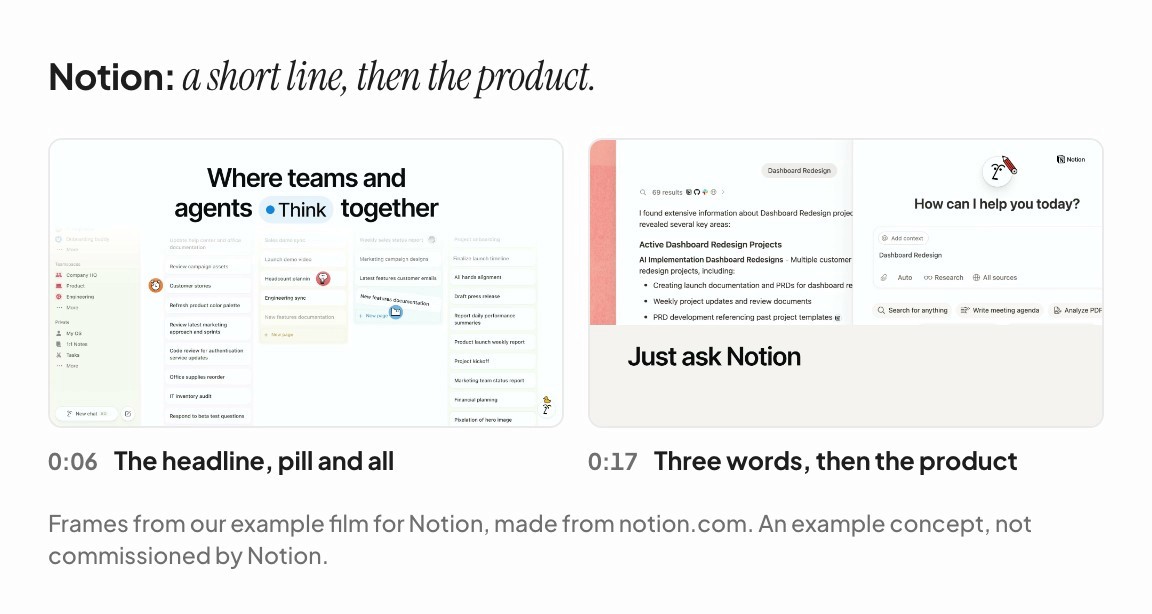
Notion has the shortest product line of the six. “Just ask Notion” is three words, lifted from the end of a sentence on Notion’s features page (“Was that info in an email? Slide deck? Slack message? Just ask Notion.”). It sits over an answer from Notion AI, with citations pulled from Notion, GitHub, Slack and the web. The viewer reads the line in under a second and spends the rest of the shot looking at the product.
The headline keeps a detail from the homepage: on notion.com the verb sits in a small pill that cycles through six words, and the film holds it on “Think”. The proof line, “98% of Forbes Cloud 100 teams use Notion”, comes from Notion’s enterprise page and counts up in place, over five customer logos from the homepage.
Line on screen | Where it came from |
|---|---|
Where teams and agents Think together | notion.com, the headline |
Bring everything into one system of record | notion.com, a feature card |
Just ask Notion | notion.com/product/features |
Keep work moving 24/7 with agents | notion.com, a feature card |
98% of Forbes Cloud 100 teams use Notion | notion.com/enterprise |
Get Notion free | notion.com, the main button |
Steal this: a short line buys the picture more time. Cut a line down only to a phrase your site prints word for word, the way “Just ask Notion” is. Watch the Notion example.
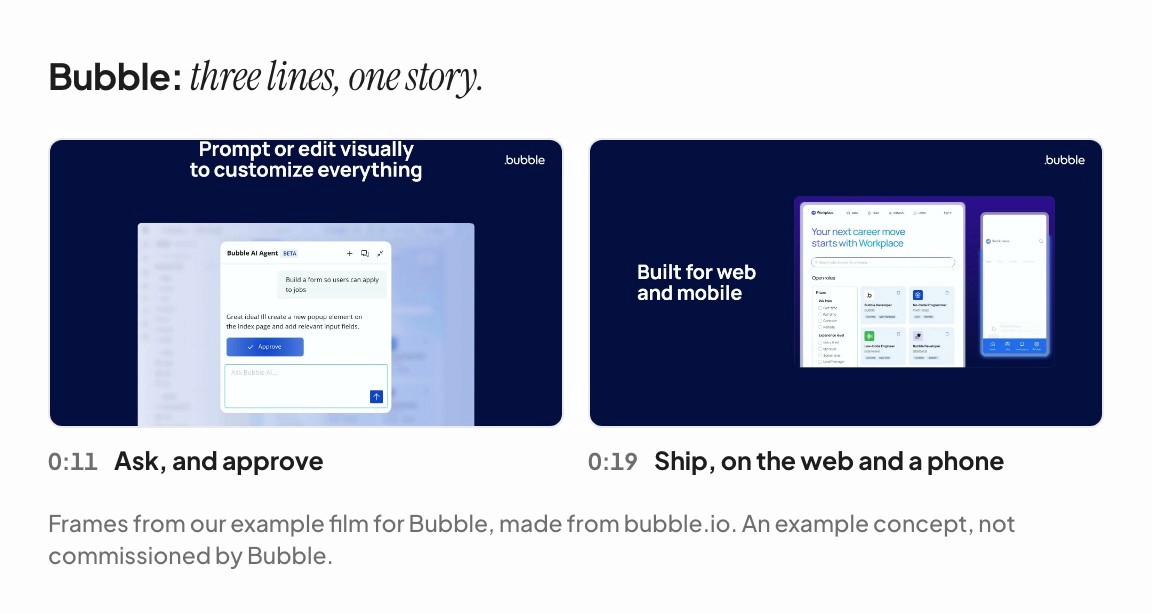
Bubble’s three product lines come from three different pages, but the picture under them tells one story, in order, in three excerpts from the animation at the top of Bubble’s homepage. In the editor, Bubble’s assistant is asked to “Build a form so users can apply to jobs”. The change is approved and the form appears. Then the app is deployed, and it rises on the web and on a phone. Ask, build, ship.
Line on screen | Where it came from |
|---|---|
Launch apps, not prototypes | bubble.io, the headline |
Prompt or edit visually to customize everything | bubble.io/features, a section heading |
Built for web and mobile | bubble.io/ai-app-builder, a section heading |
Your app, your way | bubble.io, a section heading |
Teams at leading companies trust Bubble | bubble.io/for-enterprise, a section heading |
Get started | bubble.io, the main button |
Steal this: if your lines describe steps, show one action unfolding across them instead of three unrelated screens. A viewer follows a story more easily than a list. Watch the Bubble example.
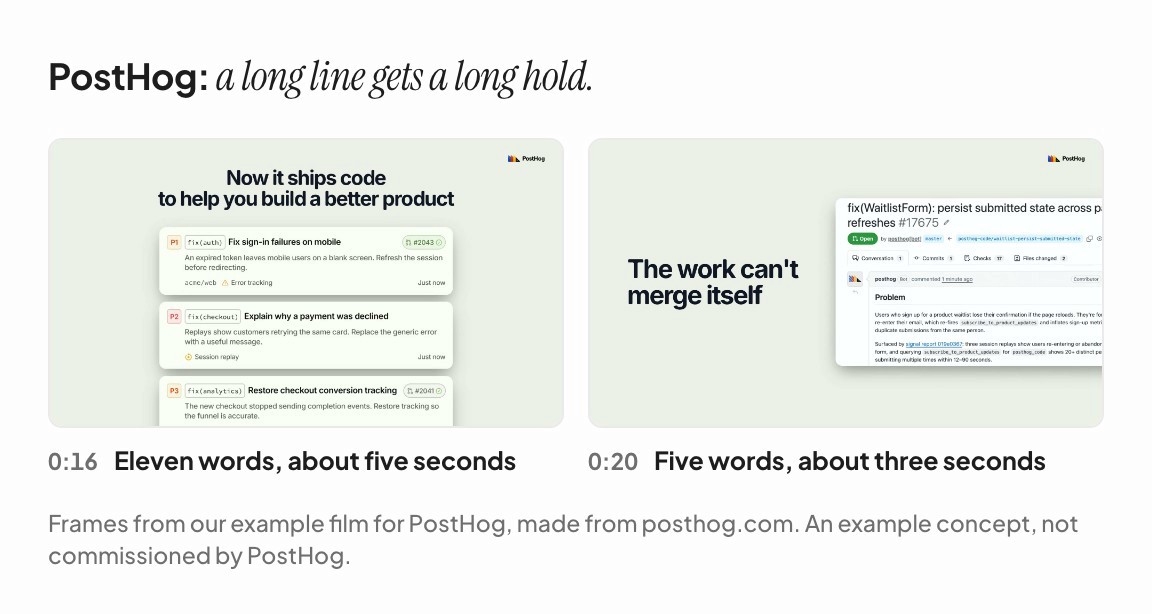
PostHog’s film carries the longest line of the six: “Now it ships code to help you build a better product”, eleven words. It stays up for about five seconds while four reports land one at a time in PostHog’s own inbox, the demo from its homepage. The next line, “The work can’t merge itself”, is five words and stays up about three seconds, over PostHog’s own screenshot of a pull request its bot opened, shown open with checks pending.
Line on screen | Where it came from |
|---|---|
Make your product self-driving | posthog.com, the headline (see below) |
PostHog already has your analytics and errors | posthog.com, under the headline (see below) |
Now it ships code to help you build a better product | posthog.com, under the headline (see below) |
The work can’t merge itself | posthog.com/self-driving |
500,000+ teams already shipping with PostHog | posthog.com |
Get started – free | posthog.com, the main button |
Steal this: let the length of a line set how long it stays up. Three words can go in two seconds. Eleven need about five. (How many words fit in a 30-second video has the reading-speed numbers.) Watch the PostHog example.

Framer’s headline is the longest of the six, “Design websites with AI, then refine every detail”, so the film breaks it at the comma into two short lines. Framer’s homepage doesn’t lead with a customer count, so the proof line is the one it does print, “Trusted by teams shipping big sites”, over three marks from its customer strip: Miro, Perplexity and Mixpanel. At 32 seconds it’s the shortest film here.
Line on screen | Where it came from |
|---|---|
Design websites with AI, then refine every detail | framer.com/design, the headline |
A freeform canvas, powered by agents | framer.com/design, a section heading |
Run your CMS with an agent | framer.com, a section heading |
Deploy fast sites on global infrastructure. | framer.com/design, a section heading |
Trusted by teams shipping big sites | framer.com, a section heading |
Get started for free | framer.com, the main button |
Steal this: proof doesn’t have to be a number. If your site shows customer logos but no count, the logos are your proof, as long as they’re customers your own site names. Watch the Framer example.

Put the six side by side and the same shape shows up in every one.
The brand, briefly. One to three seconds of wordmark, then words.
The promise. The headline (for Framer, its design page’s), on screen within about five seconds. Stripe puts its proof first, because its homepage does.
Three product lines, each over one piece of the product, with at least one shot where the product visibly does something.
One line of proof. A number, customer logos, or both.
The site’s own button, pressed, with the domain appearing inside it.
Film | Length | Words on screen | Proof |
|---|---|---|---|
Stripe | 37 s | 30 | a live counter and five customer logos |
Checkout Page | 35 s | 28 | 16,000+ businesses and six customer wordmarks |
Notion | 35.5 s | 33 | 98% of the Forbes Cloud 100 and five logos |
Bubble | 36 s | 28 | five enterprise customer logos |
PostHog | 34.5 s | 36 | 500,000+ teams and four logos |
Framer | 32 s | 36 | three customer logos |
Every film runs 32 to 37 seconds and puts 28 to 36 words on screen. (How long should a product video be? explains why that range keeps coming up.) None has a narrator, and none of them has sound at all, because the first time most people see a homepage video it’s playing on mute. (Design your product video for sound off goes into that.) And none contains a sentence the company didn’t publish first.
Why the same shape six times? Because it’s the shape of the websites. A SaaS homepage usually runs headline, features, proof, button, and the films use the sites’ own sentences in roughly that order. (Your website is already a product video makes that argument in full.)
On September 26, 2026 we checked every line in these six films against the live websites again. 33 of the 36 were still there, word for word. The three that weren’t were all PostHog’s: its headline and the two sentences under it. That morning posthog.com opened with a different headline, “Your product’s context layer”. The PostHog film was three days old, and PostHog was already testing two headlines when we made it. [2]
That isn’t a flaw in the method. Companies rewrite their homepages constantly, which is exactly why a headline is such good material for a film: it has been argued over, tested and rewritten more than any script. But it does mean a product video built from your homepage goes stale when your homepage does. It should be cheap enough to remake the week you change the page. A film that took six weeks to make tends to stay up long after the page has moved on. (Why a product video takes six weeks looks at where that time goes.)
You can run this exercise on your own homepage in about ten minutes. Copy your headline. Find three headings that each point at something visible in your product. Find one number or one row of customer logos. Copy the words on your main button. Write the page each one came from next to it, and you have a line sheet like the six above. (How to write a product video script from your own website walks through each step.)
If you’d rather see your own site cut this way, that’s what we do.
Each film was made in September 2026 from the company’s public website only. None of the six companies commissioned or endorsed its film. Customer logos appear only where the company’s own site names them as customers.
We loaded each source page listed in the tables above on September 26, 2026 and searched it for each line as written. Stripe, Checkout Page, Notion, Bubble and Framer: 30 of 30 lines found. PostHog: 3 of 6. The PostHog film was made on September 23, 2026, from one of the two headlines posthog.com was testing that day.

