
How to make a SaaS product video, step by step
A step-by-step guide to making a 30-to-60-second product video for a software company: the words, the shots, the timing, the shapes and the embed.
Sep 26, 2026
Showcase, explainer, demo, tutorial, launch, ad and customer story: who each kind of product video is for, how long it runs, and where it belongs.

“Product video” means at least seven different things. That’s why arguments about product videos go in circles. One person says a product video should be thirty seconds and silent, another says it should be three minutes with a voice-over, and both are right, because they’re picturing different videos for different people.
The useful way to sort them is by who’s watching and what they need at that moment. Style (animated, live action, screen recording) matters much less. Sort them that way and each kind turns out to have its own natural length, its own relationship to sound and its own place to live.
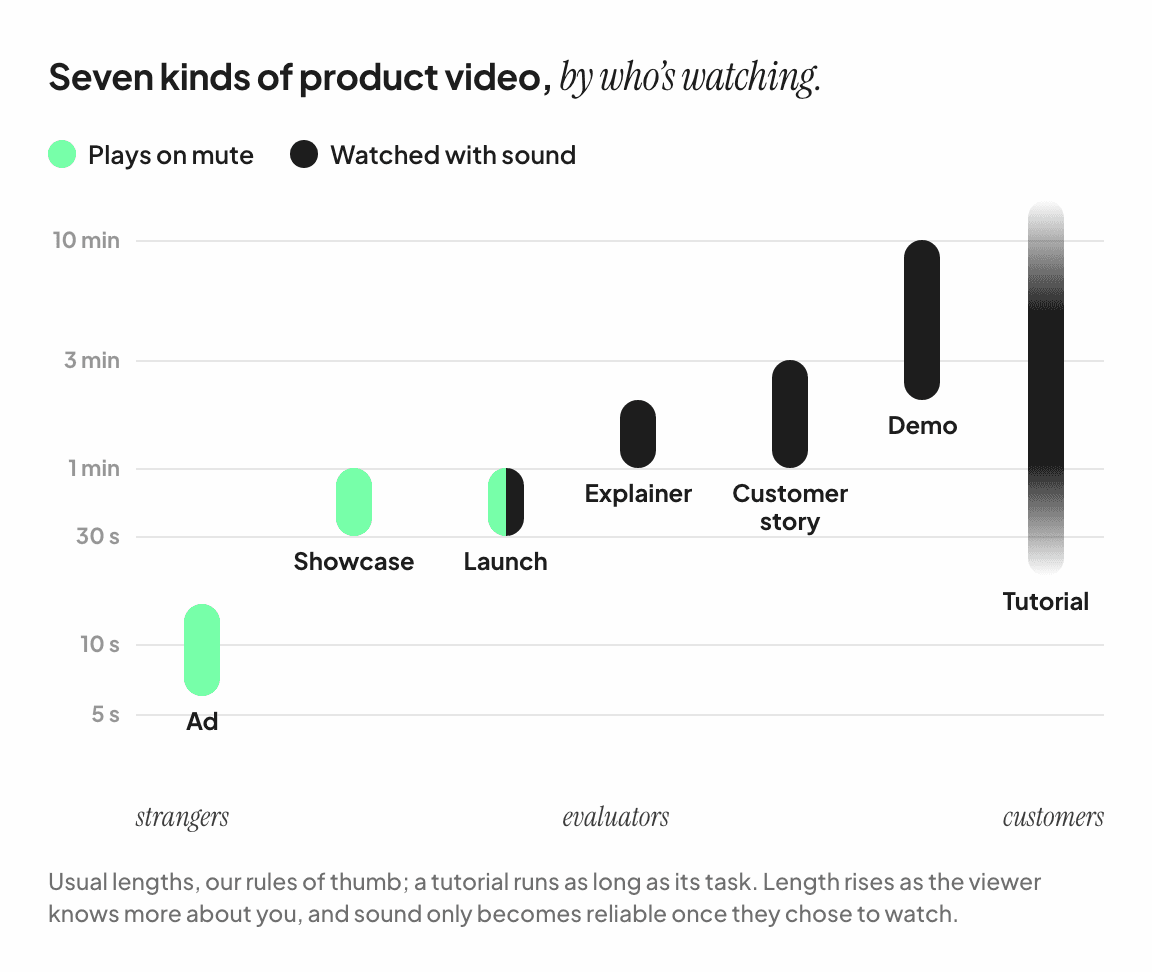
Kind | Who’s watching | Its job | Usual length |
|---|---|---|---|
Ad | Strangers in a feed | Stop the scroll | 6 to 15 seconds |
Showcase | Strangers on your site | Make them stay | 30 to 60 seconds |
Launch video | Your followers, and theirs | Say what’s new | 30 to 60 seconds |
Explainer | People new to the problem | Explain an idea | 1 to 2 minutes |
Customer story | Buyers checking you out | Prove it works | 1 to 3 minutes |
Demo | People evaluating you | Show how it works | 2 to 10 minutes |
Tutorial | Your users | Teach a task | As long as the task |
The lengths are our rules of thumb. The pattern that matters is the diagonal: the less someone knows about you, the shorter the video has to be and the less you can rely on sound.
An ad plays to people who didn’t ask to see it. Its whole job happens in the first few seconds, because that’s all most viewers give it. Meta says Instagram feed ads under fifteen seconds tend to perform best, and YouTube sells a format, the bumper ad, that lasts five to six. [1] Ads play on mute by default in most feeds, so everything has to be on screen. (The first three seconds of a product video looks at why the opening carries so much of the value.)
A product showcase video is a 30-to-60-second film for the top of a software company’s homepage. It uses the homepage’s own headline, three or four pieces of the real product, one line of proof and the call to action, works with the sound off, and comes in 16:9, 9:16 and 1:1.
A showcase is the short video at the top of your homepage, and the one you’ll reuse more than any other. Its viewer has already clicked, so it can afford more than an ad, but not much more. They landed a few seconds ago and are deciding whether to stay. Thirty to sixty seconds gives you time for a promise, three or four pieces of the product doing something, one line of proof and a call to action. (How long should a product video be? goes through the numbers.)
Browsers won’t autoplay it with sound for a new visitor, so a showcase has to work on mute. The best source for its words is your own homepage, which is why it tends to look like the page compressed. (SaaS product video examples, taken apart shows six.) This is the kind of film VideoFold makes.
A launch video announces something at a moment: a new product, a major feature, a funding round, a Product Hunt launch. Its audience is people who already follow you, plus whoever they share it with. It can lean on novelty (“here’s what’s new”) in a way a showcase can’t, because a showcase has to keep working for a year. In practice a good showcase is often the backbone of a launch video, with the new thing at the centre.
An explainer explains an idea before it shows a product. It’s the right tool when the viewer doesn’t yet understand the problem: a new category, something invisible like security or infrastructure, a product whose interface doesn’t look like what it does. Explainers are usually narrated and often illustrated, and the studios that make them tend to quote for a minute or two of finished video. (Why a product video takes six weeks looks at how they’re made.)
The risk is using an explainer where a showcase belongs. On a homepage it plays on mute, so the narration that carries the argument is gone, and what’s left is illustrations of a product the viewer still hasn’t seen.
A customer story is proof with a face. Someone who uses your product says what changed, ideally with a number. It works for buyers who already understand what you do and want to know whether it works for companies like theirs, which is why it usually lives on case study pages and in sales follow-ups rather than at the top of the homepage.
A demo shows how the product works, usually as a narrated screen recording. It’s for people who are already interested: they’ve read the page, maybe watched the showcase, and now want to see the real workflow before they book a call or sign up. Length isn’t the enemy here, because the viewer chose to watch. Clarity is the thing to protect. (Screen recording vs. product video goes into how a demo and a showcase differ.)
A tutorial teaches someone who has already bought. It lives in your help centre, your onboarding emails and your docs, and it should be exactly as long as the task. Nobody watches a tutorial on mute by accident; they came for the steps.
Almost every bad product video is a good video of one kind doing another kind’s job.
A three-minute demo at the top of the homepage, where strangers leave long before the product appears.
A narrated explainer autoplaying on mute, so its argument is never heard.
A logo-heavy brand film where a showcase should be, so visitors learn whose site they’re on, which they already knew, and nothing else.
A showcase used as onboarding, so new users get the pitch they’ve already bought.
Before you brief anyone, write down who will watch the video, where, and what they should do afterwards. The kind of video usually follows from those three answers.
For most software companies, the showcase. Most prospects pass through your homepage, most of them as strangers with the sound off, and the homepage is where you currently explain yourself with text alone. A showcase also feeds the other kinds: cut it to fifteen seconds and it’s an ad, put the new feature in the middle and it’s a launch video, and its line sheet gives your demo its opening.
Then add demos for the people who stay, customer stories for the people deciding, and tutorials once you have users to teach. (How to make a SaaS product video, step by step covers the showcase from start to finish.)
Meta Business Help Center, “Best practices for Instagram video ads”: shorter videos, under 15 seconds, tend to perform best in feed. Google Ads Help, “About video ad formats”: bumper ads are non-skippable video ads lasting between 5 and 6 seconds.

